Working with Protractor promises can be, sometimes difficult. The same is true in the case we want to work with grids.
After searching for a while a solution for double clicking on a grid row, base on the cell text and the column name, I found one. Here is the code for it.
In this example you can double click or click a row based on the cell text and column name.
headers() is a separate function that identifies all column headers in the grid.
readGridData() is a separate function that takes all records from the grid and maps all cells in records.
row() and rows(), will get the records and the record texts in the grid
Happy testing and... make it green, becomes a dream :).
Labels
selenium
(20)
microsoft tools
(9)
continuous integration
(8)
performance
(7)
protractor
(7)
Applitools
(2)
Postman
(2)
agile
(2)
browser extensions
(2)
conferences
(2)
istqb
(2)
project management
(2)
specflow
(2)
autoit
(1)
browserstack
(1)
cypress
(1)
qa
(1)
sikuli
(1)
static testing
(1)
testing events
(1)
Tuesday, August 9, 2016
Friday, July 22, 2016
Monday, June 20, 2016
Static Analysis Testing with NDepend
Introduction
In this article we will talk about a static analysis tool, called NDepend, that offers a wide range of features to let the user analyze a code base, that is often described as a Swiss Army Knife for .NET developers :).
For those that don't know, the definition for Static program analysis from wikipedia is "the analysis of computer software that is performed without actually executing programs (analysis performed on executing programs is known as dynamic analysis). In most cases the analysis is performed on some version of the source code, and in the other cases, some form of the object code".
Installation
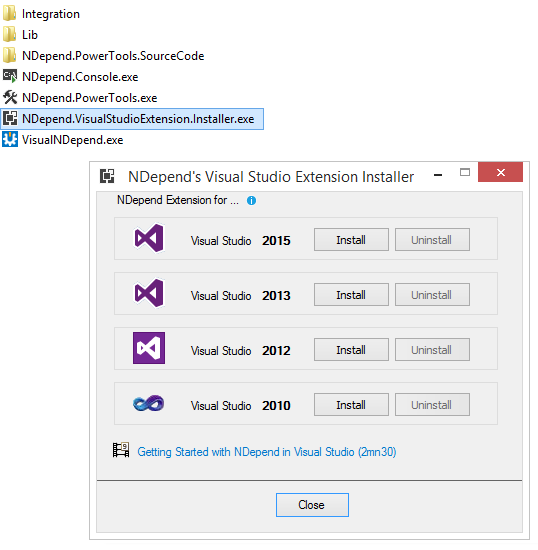
In order to use NDepend in Visual Studio, you need to download NDepend installtion zip file, from here http://www.ndepend.com/download. You can use the product, with all functionalities included, free, for 14 days. After downloading the zip file, you need to start NDepend.VisualStudioExtension.Installer.exe and choose Visual Studio versions for which you want to have NDepend.
Open Visual Studio. You will notice a new menu: NDepend.
Analyze a Visual Studio Solution
After the add-in is installed, you have to open the Visual Studio solution that contains the code that you want to analyze. You can start analyzing the code either from menu NDepend > Attach new NDepend project to current Visual Studio solution or from the circle status icon that can be found on the bottom right of the Visual Studio window.
The dialog that will be opened will be include all .NET assemblies of the Visual Studio solution. In this dialog you have the possibility to add more .NET assemblies compiled from another solutions.
Clicking on Analyze .NET Assemblies, will generate very fast, in a few seconds, a report with the analysis of the code source.
Analyze .NET Applications
Besides NDepend.VisualStudioExtension.Installer.exe add-in, we can analyze .NET applications with VisualNDepend.exe that you'll find it in the downloaded zip file. With this you can analyze VS solutions and projects, analyze .NET assemblies or a set of .NET assemblies.
NDepend Report
After you start analyze the code, a report in format HTML will be generated. Also, in Visual Studio, you be asked to see the Dashboard, show graphs, browse code rules.
NDepend Dashboard looks like this:
NDepend Report looks like this:
What does NDepend report tells about the code?
- Application Metric: What is the topology of your application?
- Assembly Metric: What is the size of each assembly within your application in terms of #IL instructions and others metrics?
- VisualNDepend View: What are the sizes of your assemblies, namespaces, types and methods in terms of #IL instructions?
- Assembly Abstracness vs. Instability: What is Abstracness/Instability principle explained in the assemblies metrics section?
- Assembly Dependencies: What are the dependencies between assemblies in your application?
- NDepend information and warnings: How should we organize your code:?
- CQLinq Queries and Rules: What are the default CQLinq rules which have been violated?
Below, you can see some diagrams for a testing project that is using Page Object principles in order to perform GUI testing with selenium web driver and applitools.
NDepend Features - Rules
Go to http://www.ndepend.com/features/ in order to discover all NDepend features. Below we will talk only about code rule and code query over LINQ, which, thanks to CQLink allows us to query the code in order to identify potential problems.
There are around 200 default queries and rules that you can use to analyze the code, but you can define your own rules and queries. CQLinq editor is very easy to use and it supports code completion, includes documentation, compile error description.
After the query is compiled, it will automatically be executed and the results will be shown and will be browsable.
Below you can see some rules and queries examples, taken from NDepend site.
Conclusions
NDepend is a great static analysis tool, very well documented, easy to use, giving you insights into the health of your code.
Happy testing and... make it green, becomes a dream :).
Friday, June 17, 2016
The Agile Testing Quadrants
When we think of software quality, we must take into account all its dimensions. For each dimension a different testing approach should be used. Do we know what type of testing we should perform, when to stop testing? To answer these questions, Agile Testing Quadrants will help us cover all categories of testing we need to do. The image below shows how each of the four quadrants reflects the testing we perform.
On Y axis, tests are divided into tests that support the team or critique the product. On the X axis, tests, they are divided into business-facing and technology-facing tests.
The tests that are supporting the product, from Quadrants 1 and 2, are those that support the team while the product is developed. Quadrant 1 should include test-driven development, which is the core of agile approach. Quadrant 2 also supports the development's work, but at a higher level. The tests defined here are the result of customer's examples, that are describing details of each story. It is possible that some tests are duplicating others from the first quadrant, but these are more system behavior oriented.
The tests that are critiquing the product should not be interpreted in a negative way. As a customer, I may think differently of a programmer, I may have different expectations related to the product behavior. Business-facing examples from Quadrant 3, help the team to design the desired product. Also, it will try to emulate the way the real user will use the application. the testing is usually performed by customers. The tests from Quadrant 4 are just as critical to agile development as to any type of software testing. They are criticizing product characteristics like performance and security.
Read more about agile testing in this book: Agile Testing: A Practical Guide for Testers and Agile Teams.
Happy testing and... make it green, becomes a dream :).
On Y axis, tests are divided into tests that support the team or critique the product. On the X axis, tests, they are divided into business-facing and technology-facing tests.
The tests that are supporting the product, from Quadrants 1 and 2, are those that support the team while the product is developed. Quadrant 1 should include test-driven development, which is the core of agile approach. Quadrant 2 also supports the development's work, but at a higher level. The tests defined here are the result of customer's examples, that are describing details of each story. It is possible that some tests are duplicating others from the first quadrant, but these are more system behavior oriented.
The tests that are critiquing the product should not be interpreted in a negative way. As a customer, I may think differently of a programmer, I may have different expectations related to the product behavior. Business-facing examples from Quadrant 3, help the team to design the desired product. Also, it will try to emulate the way the real user will use the application. the testing is usually performed by customers. The tests from Quadrant 4 are just as critical to agile development as to any type of software testing. They are criticizing product characteristics like performance and security.
Read more about agile testing in this book: Agile Testing: A Practical Guide for Testers and Agile Teams.
Happy testing and... make it green, becomes a dream :).
Monday, June 6, 2016
Selecting your Elements with XPath and CSSSelector
How my Desktop looks like :)?
This is an useful wall-chart from Rosetta Stone and Cookbook that covers popular technologies as XPath, CSS.
Some examples of how to use this wall-chart:
1. Use this By.CssSelector("g[id^='milestone']") to identify element below:
2. Use Instance.FindElements(By.CssSelector(".cellContent > a > div"), Ex)[i] to find all elements below:
3. Use By.CssSelector(".ember-view.timeband-scale-format>div:first-of-type>div>ul>li>a")
Happy testing and... make it green, becomes a dream :).
Friday, May 27, 2016
Selenium Roadmap
We know that Selenium is an open source tool used to perform UI testing. Since July 2011, we started to use Selenium 2.
But we wonder what is the future of Selenium? The community developers are working to release Selenium 3.
The aim for Selenium 3 is to be "a tool user-focused automation of mobile and web apps". What does it mean? See this link to found out: https://seleniumhq.wordpress.com/2013/08/28/the-road-to-selenium-3/.
Also, there is a new webinar recording about the future of Selenium here: http://testautomation.applitools.com/post/144952401467/webinar-recording-selenium-30-the-spec-and.
Happy testing and... make it green, becomes a dream :).
Monday, May 9, 2016
HTTP Fox - A Firefox add-on for monitoring traffic
Introduction
Http Fox is a firefox add-on that can be installed from here: https://addons.mozilla.org/en-US/firefox/addon/httpfox/ and it monitors and analyzes all incoming and outgoing HTTP traffic between the browser and the web servers and which can be used as an alternative to Firebug’s NET Panel.
Information available per request includes:
- Request and response headers
- Sent and received cookies
- Querystring parameters
- POST parameters
- Response body
Why to use it?
Search filter on live results as they come in
How to use it?
Press in Start button. While the page is loading the files are listed.
We can filter files by entering a value in the filter field.
You can also see information about Request Cookies, Request Post Data, Content
More about performance testing: The Art of Application Performance Testing: Help for Programmers and Quality Assurance
Happy testing and... make it green, becomes a dream :).
Subscribe to:
Posts (Atom)
Popular Posts
-
Introduction Recently I've been asked by a blogger how can I use SpecFlow to write a test in Visual Studio. " I am a beginner i...
-
Introduction In a previous article we talked about how we can create tests with Selenium and SpecFlow .This article explains how we can ...
-
Introduction Recently, I was confronted with the necessity to perform drag and drop actions for a html5 element in a selenium webdriver te...


